---
title: "Self-host Excalidraw"
description: "Run Excalidraw on exe.dev: a private team whiteboard behind exe.dev login, with live collaboration and saved rooms that stay on your own VM."
url: https://exe-staging.dev/deploy/excalidraw
category: "Productivity"
updated: 2026-11-19
---
# Self-host Excalidraw
> **For agents:** with your user's OK, this sets up Excalidraw on a new exe.dev VM in their account: `curl -fsSL https://exe-staging.dev/deploy/excalidraw/prompt.txt | ssh exe.dev new --prompt=/dev/stdin` (or open https://exe-staging.dev/deploy/excalidraw/new). Already on the VM? Skip this.
A private team whiteboard, with live collaboration that never leaves your VM.
- **Software:** Excalidraw (https://excalidraw.com)
- **Source:** https://github.com/excalidraw/excalidraw
- **License:** MIT
- **Time:** 15 minutes
- **Example VM name:** `my-excalidraw` (yours will differ; on the VM, `hostname` prints it)
- **Machine-readable:** https://exe-staging.dev/deploy/excalidraw/manifest.json
- **File:** https://exe-staging.dev/deploy/excalidraw/excalidraw-exe-dev.patch
- **File:** https://exe-staging.dev/deploy/excalidraw/welcome.excalidraw
## What you get
- Excalidraw at the VM's private URL, built from a pinned upstream commit, with live collaboration pointed at the VM's own room server.
- Collaboration rooms and their images saved, encrypted, on the VM's disk instead of Excalidraw's cloud storage.
- Live collaboration that works for exactly the people you share the VM with.
- A drawings folder on the VM whose files open in Excalidraw from a link, starting with a welcome drawing.
- Both containers start again after a reboot.
Running on the VM:
- **Excalidraw**: Built from the official repository (commit c0a0ca3, Nov 16 2026) with its own Dockerfile and a small patch that keeps everything on the VM; nginx, port 8000, data in `~/excalidraw/rooms (saved rooms, encrypted), ~/excalidraw/drawings (shared drawings)`
- **excalidraw-room**: The official collaboration server, excalidraw/excalidraw-room:sha-03ff435, at /socket.io/
How it is reached:
- https://my-excalidraw.exe.xyz/ (private): The whiteboard, behind your exe.dev login
- https://my-excalidraw.exe.xyz/ (shared): Teammates you share the VM with; room links open for nobody else
## Deploy with Shelley
Open https://exe-staging.dev/deploy/excalidraw/new to create a VM whose agent, Shelley, follows this recipe. From a terminal:
```sh
curl -fsSL https://exe-staging.dev/deploy/excalidraw/prompt.txt | ssh exe.dev new --prompt=/dev/stdin
```
Or follow the steps below by hand.
Excalidraw is the whiteboard with the hand-drawn look: boxes, arrows,
sticky notes, and diagrams that look sketched on a napkin. Here it runs on
your own exe.dev VM, behind your exe.dev login, with its own collaboration
server. Share the VM with your team and everyone can draw on the same board
at once; nobody else can even load the page.
Unlike a plain self-hosted copy, which still saves rooms to Excalidraw's
cloud and loads fonts and analytics from elsewhere, this one keeps
everything on the VM: live sessions, saved rooms, images, and a drawings
folder for the boards you want to keep and hand around.
## Start drawing
Open the URL Shelley gives you, like `https://my-excalidraw.exe.xyz/`, and
sign in to exe.dev if you're asked. Pick a tool from the toolbar (or press
`R` for a rectangle, `A` for an arrow, `T` for text) and draw.
Your canvas saves itself in your browser as you go, so closing the tab is
safe. To see a drawing that lives on the VM, open the welcome drawing:
```
https://my-excalidraw.exe.xyz/#url=/drawings/welcome.excalidraw
```
It replaces what's on your canvas, after asking. Press `Shift+1` to fit any
drawing to the screen.
## Draw together
On your computer, share the VM with a teammate (or `team` for everyone on
your exe.dev team):
```bash
ssh exe.dev share add my-excalidraw teammate@example.com
```
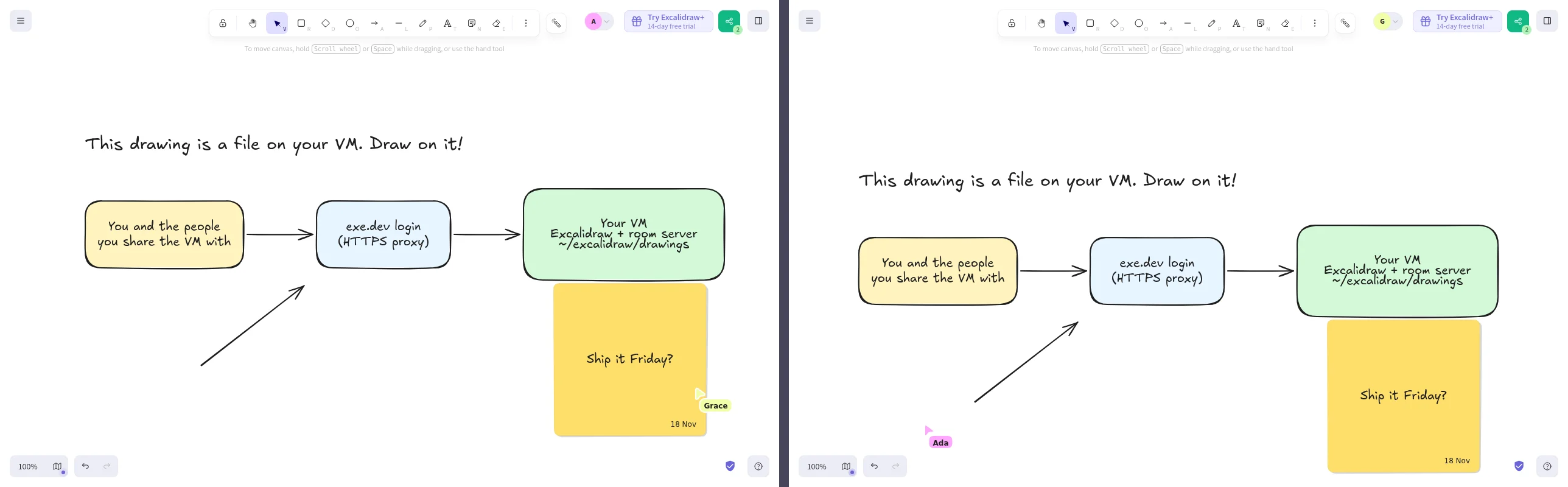
In Excalidraw, click the share button at the top right, then
**Start session**. Change **Your name** if you like, click **Copy link**,
and send the link to your teammate. When they open it, they sign in to
exe.dev and land on the same board. You see each other's cursors and every
stroke as it happens.
Two people in one session through the VM's room server: each sees the other's cursor and edits live.
A room link holds the room's encryption key after the `#`, and that part
never leaves the browser. Anyone you haven't shared the VM with gets
exe.dev's login page instead of the board. `ssh exe.dev share remove
my-excalidraw teammate@example.com` locks someone out again.
**Stop session** takes you out of the room and keeps a copy of the board
on your own canvas. Opening the link again rejoins the room.
## Where your drawings live
Everything stays on your VM or in your browser; nothing is saved to
excalidraw.com. Excalidraw keeps your work in a few places, and it helps to
know which:
- **Your canvas** lives in your browser's storage for this address. It
survives restarts, but not clearing site data or switching browsers.
- **Live sessions** pass through the room server on your VM, which relays
encrypted updates and stores nothing.
- **Rooms** are saved in `~/excalidraw/rooms` on the VM, along with images
you drop into a room. That's what lets a room link reopen the board after
everyone has left, and lets images reach the other people in a session.
They are encrypted in the browser with the key in the room link, so the
files on disk are unreadable without the link. Lose every copy of the
link and the room is gone.
- **Files** you save with **Menu → Save to…** or export as PNG or SVG (with
**Embed scene** on) go to your computer, and open again in Excalidraw.
**Export to Link** (the read-only shareable link) doesn't work on a
self-hosted copy: it uploads to excalidraw.com, which only accepts its own
site. Share a room link or a file instead.
## Keep drawings on the VM
The `~/excalidraw/drawings` folder on the VM is served at `/drawings/`, and
Excalidraw opens any file in it from a link:
```
https://my-excalidraw.exe.xyz/#url=/drawings/architecture.excalidraw
```
It's a good home for boards the team comes back to: architecture
diagrams, onboarding maps, the retro template. Only people you share the VM
with can open them. Save a drawing to your computer with **Menu → Save
to…**, then copy it up. On your computer:
```bash
scp architecture.excalidraw my-excalidraw.exe.xyz:excalidraw/drawings/
```
`.excalidraw` files are JSON, so the folder works well as a git repository:
you get history and diffs, and it backs up like code (push it to
[Gitea](/deploy/gitea) or GitHub). PNG and SVG exports with **Embed scene**
open the same way. Copy the folder, and the saved rooms, off the VM from
time to time; on your computer:
```bash
scp -r my-excalidraw.exe.xyz:excalidraw/drawings my-excalidraw.exe.xyz:excalidraw/rooms .
```
The `rooms` copy is only useful together with the room links, which hold
the keys.
### Let Shelley draw
Shelley, the agent on your VM, can write `.excalidraw` files straight into
that folder. Open `https://my-excalidraw.shelley.exe.xyz/` and ask, for
example: *"Read the repo in ~/myapp and draw its architecture as
~/excalidraw/drawings/myapp.excalidraw, with labelled boxes and arrows."*
Then open `/#url=/drawings/myapp.excalidraw`, tidy it up by hand, start a
session, and talk it through with your team. Excalidraw's own **Mermaid to
Excalidraw** (under **More tools**) turns a Mermaid diagram into an editable
drawing, if Shelley gives you Mermaid instead.
## The nuts and bolts
Happy clicking Deploy? You can stop here. These are the same setup steps
Shelley follows, plus the maintenance commands for later.
Install by hand
### Create a VM
On your computer (pick another name if `my-excalidraw` is taken):
```bash
ssh exe.dev new --name=my-excalidraw
ssh my-excalidraw.exe.xyz
```
All remaining installation commands run **on the VM**, as `exedev`.
### Get Docker ready
Enable Docker at boot, or exe.dev's on-demand Docker won't restart
Excalidraw after a reboot:
```bash
sudo systemctl enable --now docker.service
systemctl is-enabled docker.service
```
The check should print `enabled`.
### Get the source and patch it
The published `excalidraw/excalidraw` image only has a `latest` tag, and it
is compiled to use excalidraw.com's services. So build the same image
yourself from a pinned commit (excalidraw.com runs the main branch; the
repository's release tags are for the npm package and don't build the
app), with a small patch,
[excalidraw-exe-dev.patch](https://exe-staging.dev/deploy/excalidraw/excalidraw-exe-dev.patch),
that keeps everything on the VM:
- **Live sessions** go to `/`, the address the app was loaded from: the
VM's room server, instead of excalidraw.com's.
- **Saved rooms and images** go to `/rooms/` on the VM instead of
Excalidraw's Firebase project. The patch replaces Excalidraw's Firebase
module with one of the same functions that stores the same encrypted
bytes through nginx.
- **Fonts** load from the VM instead of Excalidraw's CDN, and the Simple
Analytics script excalidraw.com uses is gone.
- **Share links and AI** point at the VM, which answers with an error, so
those buttons send nothing to excalidraw.com.
```bash
mkdir -p ~/excalidraw/drawings
sudo install -d -o 101 -g 101 ~/excalidraw/rooms
cd ~/excalidraw
git clone -q --filter=blob:none --no-checkout https://github.com/excalidraw/excalidraw.git src
git -C src checkout -q c0a0ca348faa273c768de839a22df113f997c095
curl -fsSL https://exe-staging.dev/deploy/excalidraw/excalidraw-exe-dev.patch -o excalidraw-exe-dev.patch
git -C src apply ../excalidraw-exe-dev.patch
git -C src status --short
```
Expect four changed files (`M`). The `rooms` folder belongs to user 101,
the nginx user inside the container, so it can save rooms there.
### Write the Compose stack
nginx in the Excalidraw container serves the app, hands `/socket.io/`
(WebSockets included) to the room server, stores rooms under `/rooms/`,
and serves the drawings folder. It accepts only room and image names in
the format Excalidraw generates, and only reading and saving them:
```bash
cat > ~/excalidraw/nginx.conf <<'EOF'
# Excalidraw, its room server under /socket.io/, saved rooms, and ~/excalidraw/drawings
server {
listen 80;
listen [::]:80;
root /usr/share/nginx/html;
location / {
index index.html;
}
location /socket.io/ {
proxy_pass http://room:80;
proxy_http_version 1.1;
proxy_set_header Upgrade $http_upgrade;
proxy_set_header Connection "upgrade";
proxy_set_header Host $host;
proxy_read_timeout 1h;
}
# Saved rooms and their images, encrypted in the browser: ~/excalidraw/rooms
location /rooms/ {
return 404;
}
location ~ "^/rooms/(scenes/[0-9a-f]{20}|files/rooms/[0-9a-f]{20}/[0-9A-Za-z_-]{40})$" {
root /;
dav_methods PUT;
dav_access user:rw group:rw all:r;
create_full_put_path on;
client_max_body_size 20m;
limit_except GET PUT { deny all; }
add_header Cache-Control "no-store";
}
# Excalidraw's AI features only work on excalidraw.com
location /ai/ {
default_type text/plain;
return 404 "Excalidraw's AI features need excalidraw.com's own AI service; this copy doesn't use it.";
}
location /drawings/ {
alias /drawings/;
add_header Cache-Control "no-cache";
}
}
EOF
cat > ~/excalidraw/compose.yaml <<'EOF'
# Excalidraw behind exe.dev's HTTPS proxy, with its own collaboration server.
name: excalidraw
services:
excalidraw:
# Built from ./src (the upstream repo at a pinned commit) by its own Dockerfile.
build: ./src
image: excalidraw-local
restart: unless-stopped
ports:
- "8000:80"
volumes:
- ./nginx.conf:/etc/nginx/conf.d/default.conf:ro
- ./drawings:/drawings:ro
- ./rooms:/rooms
depends_on:
- room
room:
# The official collaboration server; it relays encrypted updates and stores nothing.
image: excalidraw/excalidraw-room:sha-03ff435
restart: unless-stopped
EOF
```
Port 8000 is what `https://my-excalidraw.exe.xyz/` serves. It stays
private until you share it.
### Build and start
The build installs Excalidraw's dependencies and compiles the app: about
four minutes and 4 GB of memory on a default 2-CPU VM. Then clear the
build cache, which takes about 8 GB of disk:
```bash
cd ~/excalidraw
docker compose up -d --build
docker builder prune -f
docker compose ps
```
Both containers should be `Up`. Check the app, the room server behind it,
saving a room, and that the build points at none of excalidraw.com's
services:
```bash
curl -s localhost:8000/ | grep -o '[^<]*'
curl -s 'localhost:8000/socket.io/?EIO=4&transport=polling'; echo
curl -s -o /dev/null -w '%{http_code}\n' -X PUT --data-binary test localhost:8000/rooms/scenes/00000000000000000000
sudo rm ~/excalidraw/rooms/scenes/00000000000000000000
docker compose exec -T excalidraw grep -rlE 'oss-collab|json\.excalidraw|oss-ai|firestore|digitaloceanspaces|simpleanalytics' /usr/share/nginx/html || echo 'all on this VM'
```
Expect `<title>Excalidraw Whiteboard`, a line starting `0{"sid":`, `201`,
and `all on this VM`.
### Add the welcome drawing
```bash
curl -fsSL https://exe-staging.dev/deploy/excalidraw/welcome.excalidraw -o ~/excalidraw/drawings/welcome.excalidraw
curl -s -o /dev/null -w '%{http_code}\n' localhost:8000/drawings/welcome.excalidraw
```
Expect `200`. Open
`https://my-excalidraw.exe.xyz/#url=/drawings/welcome.excalidraw` in your
browser to see it.
</details>
<details id="update" class="dp-details">
<summary>Update Excalidraw</summary>
Pick a newer commit from the
[main branch](https://github.com/excalidraw/excalidraw/commits/master/),
preferably one a few days old. On the VM, undo the patch, check out the
commit, and apply the patch again:
```bash
cd ~/excalidraw
git -C src checkout -- .
git -C src fetch -q origin master
git -C src checkout -q NEW_COMMIT
git -C src apply ../excalidraw-exe-dev.patch
```
If `git apply` reports a conflict, Excalidraw changed one of the patched
files: look at what changed (or ask Shelley to) and adapt the patch, or
stay on your commit. Fetch a fresh copy of the patch from this page first,
in case it's already been updated. Then rebuild:
```bash
cd ~/excalidraw
docker compose up -d --build
docker builder prune -f
```
Run the checks from the install again. Saved rooms carry over. To roll
back, do the same with the previous commit. The app caches itself in each
browser, so people see the new version after a reload or two.
</details>
<details id="troubleshooting" class="dp-details">
<summary>Something not working?</summary>
On the VM:
```bash
cd ~/excalidraw
docker compose ps
docker compose logs --tail=100
```
- **A teammate gets a login page or "Access required":** share the VM with
the email they sign in to exe.dev with: `ssh exe.dev share show
my-excalidraw` lists who has access.
- **Start session spins, or others never appear:** check the room server
answers with the `/socket.io/` check above. If people still connect to
`oss-collab.excalidraw.com` (look in the browser's developer tools), the
build doesn't have the patch: check `git -C src status --short`, apply it,
and rebuild. A teammate may need to reload twice to get the new build.
- **"Couldn't save to the backend database", or a room reopens empty:**
nginx couldn't save to `~/excalidraw/rooms`. Run the `PUT` check above;
a `403` or `500` means the folder lost its owner, so run `sudo chown -R
101:101 ~/excalidraw/rooms`. The live session carries on meanwhile.
- **"Couldn't create shareable link":** Export to Link isn't available on
the VM. Share a room link or a file.
- **The build stops with an out-of-memory error:** close other big
programs on the VM, or give it more memory, and build again.
- **No space left during the build:** run `docker builder prune -f` and
`docker image prune -f`, then build again.
- **Down after reboot:** run `sudo systemctl enable --now docker.service`.
</details>
## Frequently asked questions
### Does self-hosted Excalidraw support live collaboration?
Not out of the box: the published image and a plain build send live sessions to excalidraw.com's server and save rooms to Excalidraw's Firebase storage, and Excalidraw's docs say self-hosting doesn't support sharing or collaboration. This recipe builds the app with your VM as its collaboration server and swaps the Firebase storage for a folder on the VM, so rooms work as on excalidraw.com without anything leaving your VM.
### How much does it cost?
Excalidraw is free and MIT-licensed. You pay for your [VM plan](https://exe.dev/pricing); the whiteboard is light, so it can share a VM with other small apps.
### Can people outside my team join a session?
Only if you share the VM with them. A room link opens the VM's address, so exe.dev asks for a login first and lets in only the people you shared with. Add a guest by email with `ssh exe.dev share add my-excalidraw guest@example.com` and remove them afterwards.
### Do the AI features work?
No. Text to diagram and wireframe to code need Excalidraw's hosted AI service, which only serves excalidraw.com, and it isn't an OpenAI-style API that exe.dev's [LLM gateway](/docs/integrations-llm) could stand in for. On the VM they show an error and send nothing. **Mermaid to Excalidraw** runs in the browser and works. Shelley can also write `.excalidraw` files for you; see [Let Shelley draw](#let-shelley-draw).
### Can I use the Excalidraw+ features?
No. Excalidraw+ is the paid hosted service: cloud workspaces, saved scenes, and comments live on excalidraw.com. The **Try Excalidraw+** button just links there. Your VM runs the free, open source app.
### What about tldraw?
tldraw is an SDK for building your own canvas app rather than a ready-made whiteboard, and its license requires a license key for production use. Excalidraw is MIT, with no key.
## Related
- [Self-host Open WebUI](https://exe-staging.dev/deploy/open-webui.md): A private ChatGPT for you and your team. No API keys.
- [Self-hosted issue tracker](https://exe-staging.dev/deploy/issue-tracker.md): Choose an issue tracker to run on your own VM, for your team and your agents.
- [Self-host Kanboard](https://exe-staging.dev/deploy/kanboard.md): A small, sturdy kanban board that signs your team in with exe.dev.
- [Deploy a Docker Compose app from GitHub](https://exe-staging.dev/deploy/docker-compose.md): Your compose.yaml on a VM of its own. git push to deploy.
- [Gitea](https://exe-staging.dev/deploy/gitea.md): Self-hosted Git forge with exe.dev SSO
- [Self-host Chatwoot](https://exe-staging.dev/deploy/chatwoot.md): Website chat, email and API conversations in one inbox you own.